
1. 내용
- Azure Application Insights에서 NodeJS Application Monitoring
- 해당 테스트 과정은 Application Insights SDK를 이용해서 데이터 값을 모니터링 할 수 있도록 하였습니다.
2. 순서
1) Application Insights SDK를 이용해서 분산 추적 모니터링이 가능하도록 Node JS Application 생성
2) Azure Application insights 트랜잭션 검색 확인
3. 테스트
1) Application Insights SDK를 이용해서 분산 추적 모니터링이 가능하도록 Node JS Application 생성
- 간단한 Frontend를 NodeJS로 구성하여 테스트를 진행합니다.
- 이미지를 업로드하기 위한 Application을 만들고 Application의 각 이벤트마다 operation ID를 할당하여 해당 operation ID 기반으로 트랜잭션을 검색하여 모니터링 할 수 있도록 구성합니다.
- Node JS 코드
// app.js
require('dotenv').config();
const express = require('express');
const multer = require('multer');
const path = require('path');
const axios = require('axios');

// appInsights 모듈 사용
const appInsights = require('applicationinsights');

// 고유 operation ID를 할당하기 위해서 uuid 모듈 사용
const { v4: uuidv4 } = require('uuid');

// Application Insights 설정 (Application Insights SDK사용)
appInsights.setup(process.env.APPINSIGHTS_CONNECTION_STRING) # .env의 변수에서 Azure Application Insights 연결문자열를 가져와 연결을 진행합니다.
    .setAutoDependencyCorrelation(true)  # 요청과 종속성을 연관지어 추적합니다.
    .setAutoCollectRequests(true)  # HTTP 요청을 자동으로 추적합니다.
    .setAutoCollectPerformance(true) # CPU와 메모리 사용률을 모니터링합니다.
    .setAutoCollectExceptions(true) # 예외를 자동으로 추적합니다.
    .setAutoCollectDependencies(true) # 외부 종속성(예: 데이터베이스, API 호출)을 추적합니다.
    .setAutoCollectConsole(true) # 콘솔 로그를 추적합니다.
    .setUseDiskRetryCaching(true) # 실패한 원격 전송을 디스크에 임시로 저장합니다.
    .setSendLiveMetrics(true)# 실시간 메트릭을 활성화합니다.
    .setDistributedTracingMode(appInsights.DistributedTracingModes.AI_AND_W3C) # W3C 및 Application Insights의 분산 추적 모드 활성화합니다.
    .start();

const client = appInsights.defaultClient;
const app = express();
const port = 3001;

// Multer 설정
const storage = multer.memoryStorage();
const upload = multer({ storage: storage });

// EJS 템플릿 엔진 설정
app.set('view engine', 'ejs');

// 정적 파일 제공
app.use(express.static('public'));

// 커스텀 미들웨어: 요청 추적
app.use((req, res, next) => {
    if (!req.context) {
        req.context = {};
    }

    // 요청마다 고유한 Operation ID 생성 및 설정
    req.context.operationId = req.headers['traceparent'] || uuidv4();  ## uuid 기반으로 고유 값을 만들어 opertaionId로 정의합니다.
    req.context.parentId = client.context.tags[client.context.keys.operationParentId];

    // 디버깅용 로그 출력
    console.log("Operation ID:", req.context.operationId);
    console.log("Parent ID:", req.context.parentId);

    req.context.startTime = Date.now();

    res.on('finish', () => {
        const duration = Date.now() - req.context.startTime;

        client.trackRequest({
            name: `${req.method} ${req.url}`,
            url: req.url,
            duration: duration,
            resultCode: res.statusCode,
            success: res.statusCode < 400,
            properties: {
                operationId: req.context.operationId
            }
        });
    });

    next();
});


// 메인 페이지
app.get('/', (req, res) => {
    // 페이지뷰 추적
    client.trackPageView({
        name: 'Upload Page',
        url: req.url,
        properties: {
            operationId: req.context.operationId  # operationId를 이용해서 분산 추적을 진행할수 있도록 합니다.
        }
    });

    res.render('index');
});


// 파일 업로드 처리
app.post('/upload', upload.single('image'), async (req, res) => {
    try {
        // 파일 업로드 시작 이벤트 추적
        client.trackEvent({
            name: 'FileUploadStarted',
            properties: {
                fileName: req.file.originalname,
                fileSize: req.file.size,
                operationId: req.context.operationId
            }
        });

        // 메트릭 추적
        client.trackMetric({
            name: 'FileSize',
            value: req.file.size
        });

        // 백엔드 API 호출
        const formData = new FormData();
        formData.append('file', req.file.buffer, req.file.originalname);

        const dependencyStartTime = Date.now();
        try {
            const backendResponse = await axios.post(
                `${process.env.BACKEND_API_URL}/upload`,
                formData,
                {
                    headers: {
                        'Content-Type': 'multipart/form-data',
                        'Request-Id': req.context.operationId,
                        'x-operation-id': req.context.operationId
                    }
                }
            );

            // 성공 이벤트 추적
            client.trackEvent({
                name: 'FileUploadCompleted',
                properties: {
                    fileName: req.file.originalname,
                    operationId: req.context.operationId,
                    duration: Date.now() - dependencyStartTime
                }
            });

            // 종속성 추적
            client.trackDependency({
                target: process.env.BACKEND_API_URL,
                name: 'UploadToBackend',
                data: 'POST /upload',
                duration: Date.now() - dependencyStartTime,
                resultCode: backendResponse.status,
                success: true,
                properties: {
                    operationId: req.context.operationId
                }
            });

            res.json({
                success: true,
                message: 'File uploaded successfully',
                operationId: req.context.operationId
            });

        } catch (error) {
            // 종속성 오류 추적
            client.trackDependency({
                target: process.env.BACKEND_API_URL,
                name: 'UploadToBackend',
                data: 'POST /upload',
                duration: Date.now() - dependencyStartTime,
                resultCode: error.response?.status || 500,
                success: false,
                properties: {
                    operationId: req.context.operationId
                }
            });
            throw error;
        }

    } catch (error) {
        // 예외 추적
        client.trackException({
            exception: error,
            properties: {
                fileName: req.file?.originalname,
                operationId: req.context.operationId
            }
        });

        res.status(500).json({
            success: false,
            message: 'Error uploading file',
            operationId: req.context.operationId
        });
    }
});


// 서버 시작

app.listen(port, () => {
    console.log(`Server running at http://localhost:${port}`);
    client.trackEvent({ name: 'ServerStarted' });
});

// 예기치 않은 오류 처리
process.on('uncaughtException', (error) => {
    client.trackException({ exception: error });
});

process.on('unhandledRejection', (reason) => {
    client.trackException({ exception: reason });
});# package.json
{
"name": "testnodejs",
"version": "1.0.0",
"main": "index.js",
"scripts": {
"test": "echo \"Error: no test specified\" && exit 1"
},
"keywords": [],
"author": "",
"license": "ISC",
"description": "",
"dependencies": {
"applicationinsights": "^3.4.0",
"axios": "^1.7.7",
"dotenv": "^16.4.5",
"ejs": "^3.1.10",
"express": "^4.21.1",
"multer": "^1.4.5-lts.1",
"testnodejs": "file:",
"uuid": "^11.0.2"
}
}# .env
APPINSIGHTS_CONNECTION_STRING="Azure Application Insights 연결문자열"
# BACKEND_API_URL="http://localhost:8080/api"# views/index.ejs
<!-- views/index.ejs -->
<!DOCTYPE html>
<html>
<head>
<title>Image Upload</title>
<style>
body {
font-family: Arial, sans-serif;
max-width: 800px;
margin: 0 auto;
padding: 20px;
}
.upload-container {
border: 2px dashed #ccc;
padding: 20px;
text-align: center;
}
.upload-status {
margin-top: 20px;
padding: 10px;
display: none;
}
.success {
background-color: #d4edda;
color: #155724;
}
.error {
background-color: #f8d7da;
color: #721c24;
}
</style>
</head>
<body>
<div class="upload-container">
<h2>Image Upload</h2>
<form id="uploadForm">
<input type="file" name="image" accept="image/*" required>
<button type="submit">Upload</button>
</form>
<div id="status" class="upload-status"></div>
</div>
<script>
document.getElementById('uploadForm').addEventListener('submit', async (e) => {
e.preventDefault();
const formData = new FormData(e.target);
const statusDiv = document.getElementById('status');
try {
const response = await fetch('/upload', {
method: 'POST',
body: formData
});
const result = await response.json();
statusDiv.className = 'upload-status ' + (result.success ? 'success' : 'error');
statusDiv.textContent = `${result.message} (Operation ID: ${result.operationId})`;
statusDiv.style.display = 'block';
} catch (error) {
statusDiv.className = 'upload-status error';
statusDiv.textContent = 'Error uploading file';
statusDiv.style.display = 'block';
}
});
</script>
</body>
</html>
2) Azure Application insights 트랜잭션 검색 확인
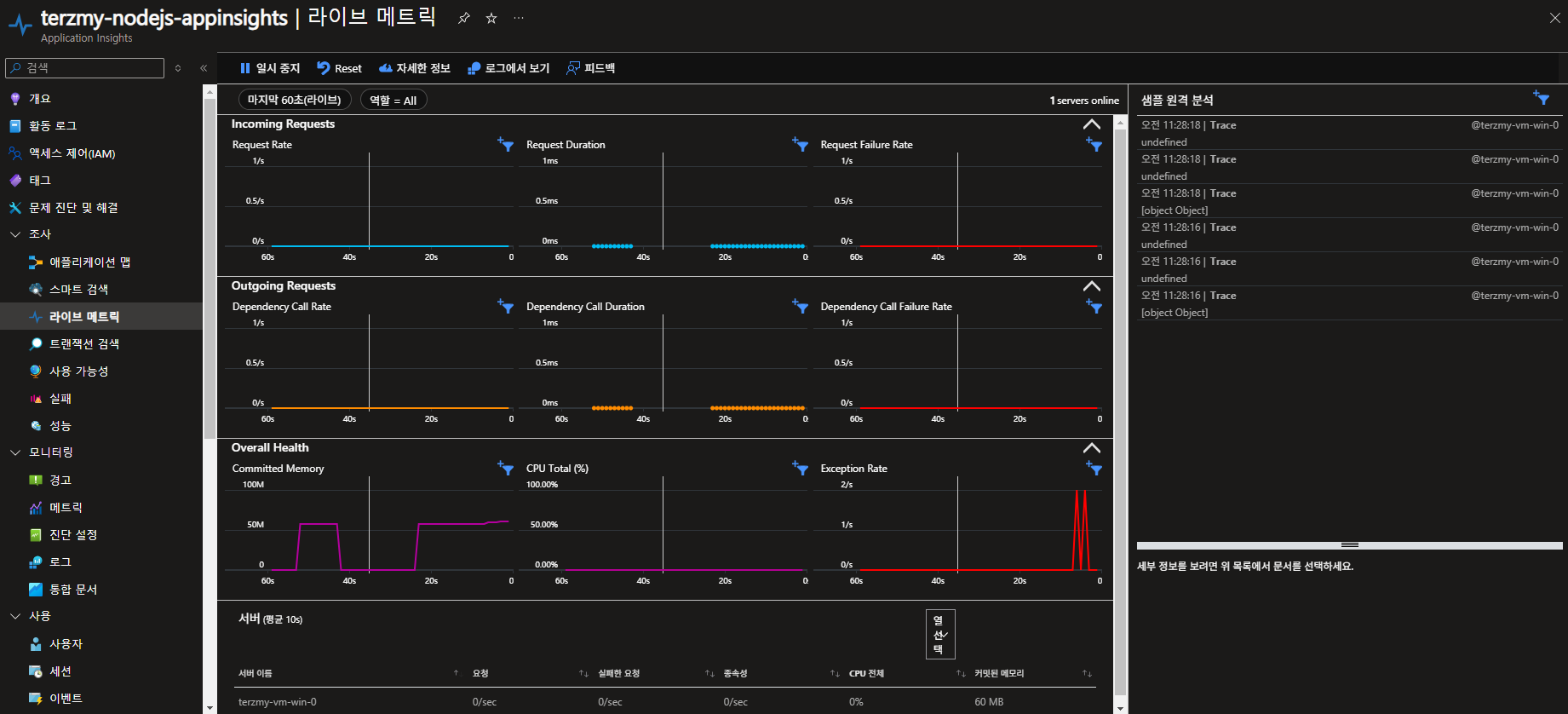
- 라이브 메트릭
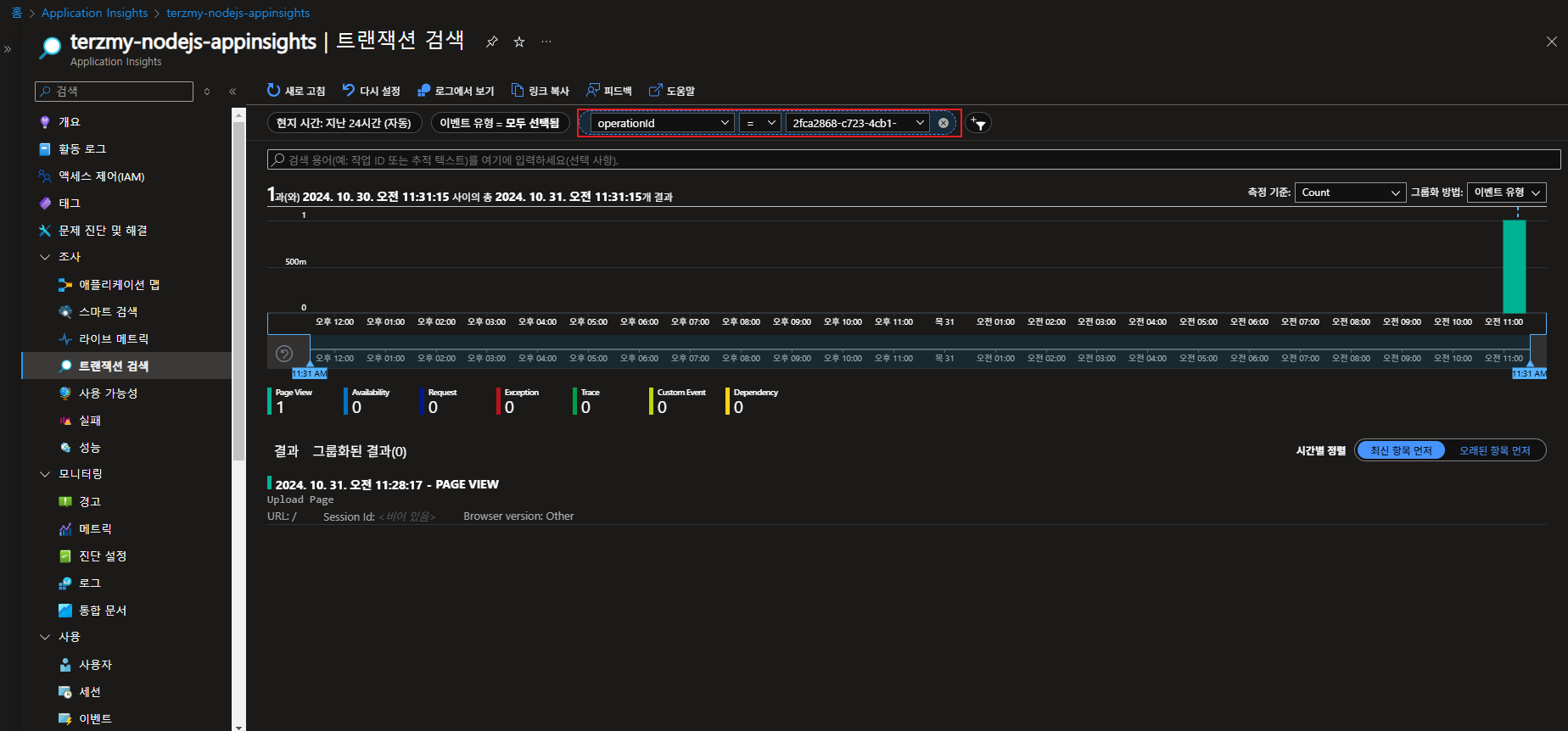
- 트랜잭션 검사
콘솔 로그를 통해서 이벤트에 대한 operation id 확인 합니다.

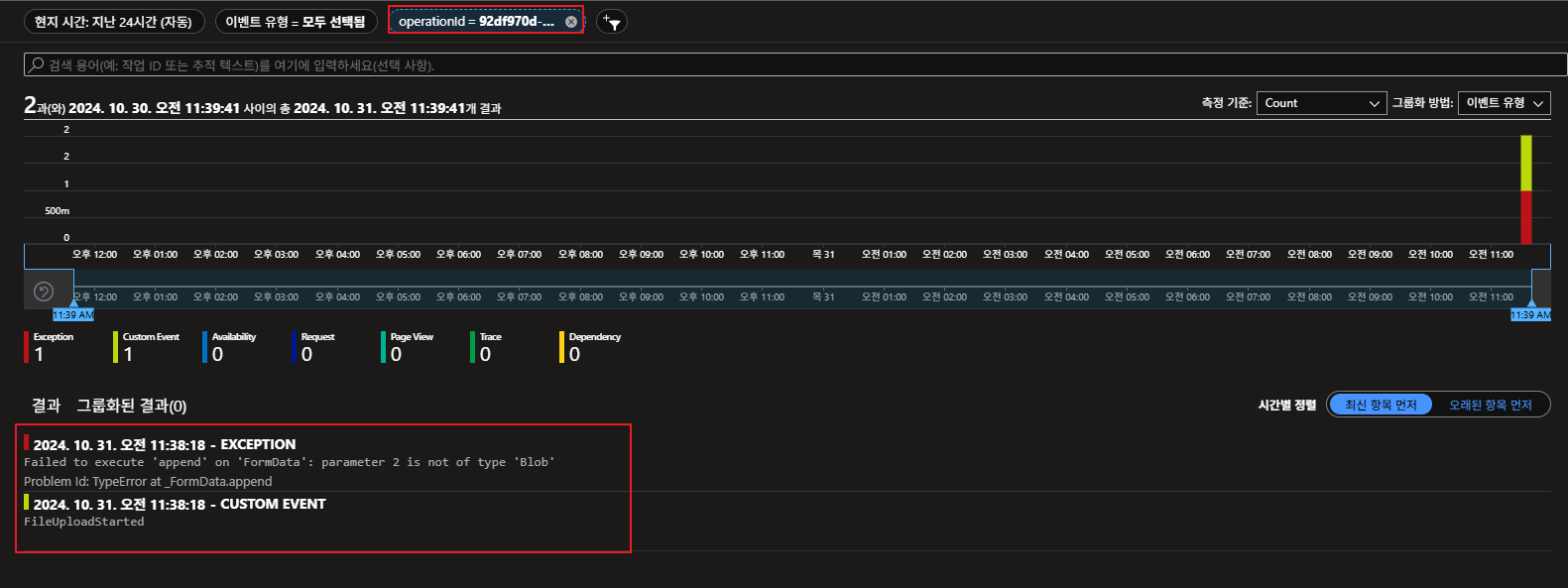
- 이미지 업로드 했을때 트랜잭션 추적


'Azure' 카테고리의 다른 글
| Azure Kubernetes Service & Grafana Tempo (0) | 2024.11.01 |
|---|---|
| Azure Application Insights를 이용한 Application Monitoring (nodejs)- 2/2 (1) | 2024.10.31 |
| Azure Application Insights를 이용한 Application Monitoring (java) (0) | 2024.10.29 |
| [Study] Public & Private AKS Cluster (0) | 2024.10.21 |
| [Study] Gitlab(CI)&ArgoCD를 이용해 AKS 배포 (1) | 2024.10.16 |
