
1. 내용
1) Azure Kubernetes Service에서 제공하는 Public & Private AKS Cluster 특징에 대해서 알아본다.
2) AKS Control plane에 접근하는 방법은 크게 4가지 정도로 나뉜다.
- Public Cluster (Public FQDN and Public for Control Plane)
- Private Cluster using Private endpoint (Private IP for Control plane)
- Public Cluster using VNET Integration
- Private Cluster using VNET Integration
2. Public AKS
1) Public AKS Cluster
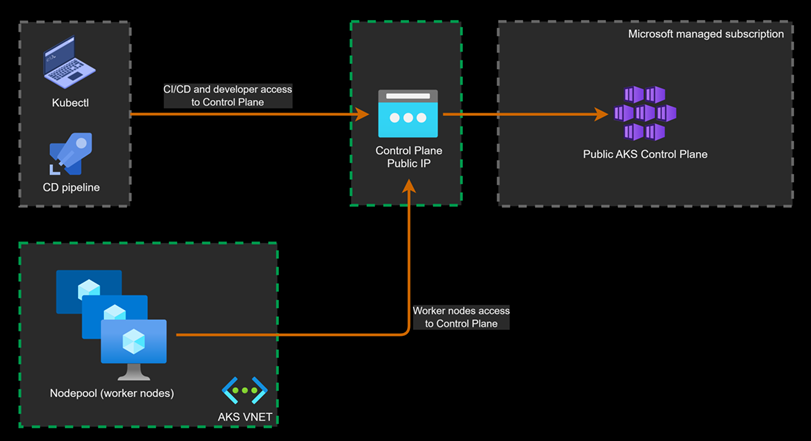
- 아키텍처
- 특징
- Control Plane은 Public FQDN과 Public IP 주소로 노출 되어있다.
- Control Plane 엔드포인트는 인터넷에 노출되어 있다.
- 인증된 IP 주소 범위 : Control Plane에 접근하기 위한 화이트 리스트 IPs
- 워커 노드 또한 Public IP를 통해서 Control Plane에 접근 한다.
- 생각
- 간단한 테스트 용도 말곤 보안 이슈가 있으므로 잘 사용하지 않을 것 같다.
- 워크 노드 자체도 격리되어 있지 않아서 보안상 문제가 있지 않나 싶다.
2) Public AKS Cluster with vnet integration (preview)
- 아키텍처

- 특징
- Control Plane은 Public IP를 가진 Public FQDN으로 노출되어 있다.
- Control Plane 엔드포인트는 인터넷에 노출되어 있다.
- Private Cluster를 제외하고 Public FQDN을 비활성화 할 수 없다.
- DevOps CD 파이프라인은 Public 또는 Private IP를 통해서 접근할 수 있다.
- 워커 노드는 Control Plane에 Internal LB(Private IP=kube-apiserver)로 접근이 가능하다.
- vnet integration 사용하게 되면, Managed Container Resource Group(MC로 시작하는 리소스 그룹)에 kube-apiserver라는 이름을 가진 Internal LB가 생성된다.
- Public AKS Cluster라고 해서 완전히 열려 있는것이 아니다. Azure에서 기본적으로 권한 있는 사용자(로그인필요)만 API 서버에 접근할 수 있도록 제한한다.
- 생각
- 개발/테스트 환경이나 덜 민감한 워크로드 환경에서 Public AKS Cluster with vnet integration이 가능할 것 같다.
- 워크 노드는 Private하게 유지하고 개발자 및 관리자들이 접근하기 쉽도록 Control Plane만 Public하게 유지한다.
- 위에서 말했듯이 완전한 Public이 아니니 테스트 용으로 적합하지 않을까 생각이 든다.
- 주의
- API Server를 Vnet Integration 하기 위해서는 별도의 Integration 전용 서브넷이 필요하다.
- 여기서, 워크노드와 같은 서브넷을 사용해서는 안된다.
- Public AKS Cluster with vnet integration 환경을 구축하기 위해서는 사전에 별도 작업이 필요하다.
- aks-preview 확장자 설치 후 기능을 등록하는 작업이 필요하다.
az extension add --name aks-preview

az feature register --namespace "Microsoft.ContainerService" --name "EnableAPIServerVnetIntegrationPreview"

az aks update --name $CLUSTER_NAME \
--resource-group $RG_NAME \
--enable-apiserver-vnet-integration \
--apiserver-subnet-id $API_SNET_ID
3. Private AKS
1) Private AKS Cluster
- 아키텍처

- 특징
- Control Plane은 Private IP를 가지고 있는 Public FQDN으로 노출 된다.
- Control Plane은 인터넷으로 노출되지 않는다.
- Public FQDN은 비활성화 또는 활성화 될 수 있다. (AzCLI로 가능)
- 워커 노드는 Private endpoint를 통해서 Control Plane에 접근할 수 있다.
- Private FQDN은 Private DNS Zone을 통해서만 확인할 수 있다
- 생각
- Private endpoint를 활용해 접근하는 방식이 주로 사용되는 방식이다. (현재까지는..)
- Private AKS Cluster에 접근하기 위해서는 Jumpbox VM이 필요하다.
- 외부에서 접근은 안되고 워커노드 또는 Jumpbox VM에서 private endpoint를 타고 Control Plane에 접근 가능하니 보안상 문제도 없어보인다.
- Private DNS Zone을 사용하니 Private DNS에대한 관리도 용이해보인다.
- Private endpoint에 대한 비용이 발생하는 것은 단점이지 않을까 생각이 든다.
- 만약 다른 Azure 서비스들이 Private endpoint를 사용중이면 일관성을 위해서 사용하는 것도 좋을 것 같다.
2) Private AKS Cluster with vnet integration (preview)
- 아키텍처
- 특징
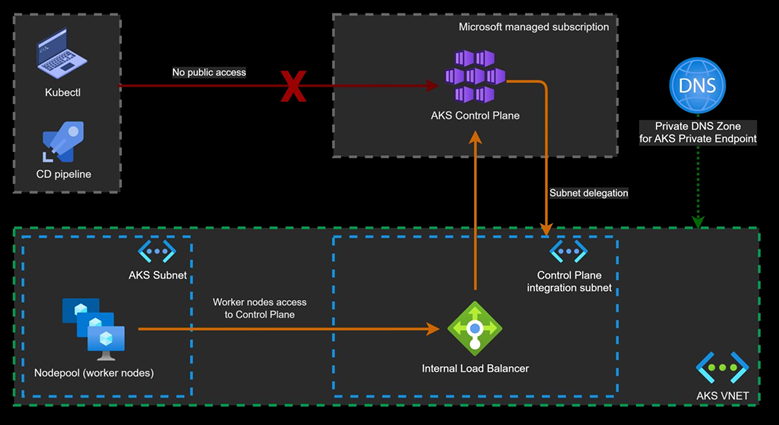
- Control Plane은 오직 Internal LB(Private IP=kube-apiserver)를 통해서만 노출된다.
- Control Plane은 인터넷에 노출된 public FQDN을 가지고있다.
- Public FQDN은 private IP를 참조하고 비활성화 될 수 있다.
- DevOps CD 파이프라인은 오직 Private IP(kube-apiserver의 Frontend IP)를 통해서 접근할 수 있다.
- 워커 노드는 Private IP(kube-apiserver의 Frontend IP)를 통해서 Control Plane에 접근한다.
- 비록 Private AKS Cluster이지만, Private endpoint는 생성되지 않는다.
- vnet integration이 되었기 때문에 Internal LB(Private IP=kube-apiserver)가 생긴다.
- 생각
- Private endpoint를 사용하지 않고 구성할 수 있는 Private AKS Cluster이다.
- Private endpoint를 사용하지 않으니까 비용이 조금은 절감되지 않을까 생각이 든다. (얼마안하겠지만..)
- Azure 네트워크 수준에서 완전히 격리 가능하다.
- 주의
- 기존 구성되어 있던 Public AKS Cluster with vnet integration 환경을 Private하게 업데이트 가능하다.
- Public AKS Cluster with vnet integration 과정과 비슷하지만 --enable-private-cluster로 private AKS로 업데이트 가능하다.
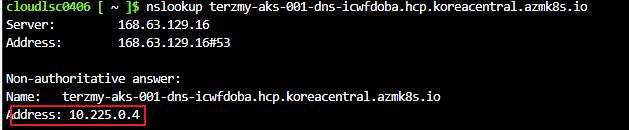
- --enable-prviate-cluster 옵션을 사용하면 MC Resource Group에 Private DNS Zone이 생기며 해당 영역에 A레코드로 Internal LB(privateIP=kube-apiserver)가 등록된다.
- 생성된 Private DNS Zone에 Azure VM이 해당되는 가상 네트워크와 가상 네트워크 링크를 설정하면 Azure VM에서 nslookup 했을때 P Internal LB(privateIP=kube-apiserver)가 나타난다.
az extension add --name aks-preview

az feature register --namespace "Microsoft.ContainerService" --name "EnableAPIServerVnetIntegrationPreview"

az aks update --name $CLUSTER_NAME \
--resource-group $RG_NAME \
--enable-apiserver-vnet-integration \
--apiserver-subnet-id $API_SNET_ID

az aks update --name terzmy-aks-001 \
--resource-group cheol-kbhc-rg \
--enable-private-cluster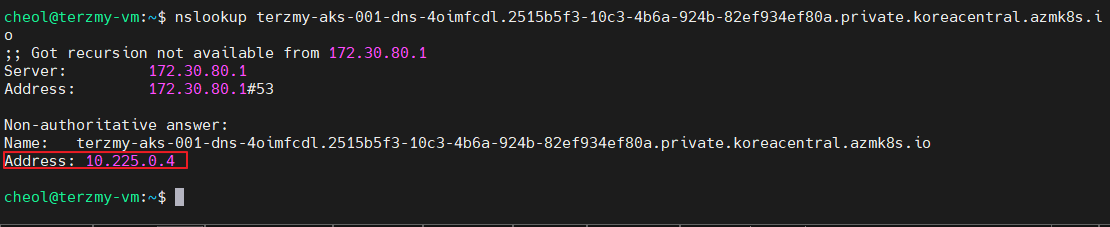
참고 : 유데미 강의 (Advanced Kubernetes/AKS Network & Infrastructure - Houssem Dellai) 학습 자료
study라 틀린점이 많을 수 있어요 댓글로 정정해주시면 감사하겠습니다 :)
'Azure' 카테고리의 다른 글
| Azure Application Insights를 이용한 Application Monitoring (nodejs)- 1/2 (0) | 2024.10.31 |
|---|---|
| Azure Application Insights를 이용한 Application Monitoring (java) (0) | 2024.10.29 |
| [Study] Gitlab(CI)&ArgoCD를 이용해 AKS 배포 (1) | 2024.10.16 |
| Azure Blob Storage & SAS Token & Azure SDK for Java (1) | 2024.10.11 |
| Managed Grafana & Prometheus를 이용한 AKS Monitoring (0) | 2024.10.04 |
