
Terraform으로 클라우드 인프라를 코드로 관리하는 것은 현대 DevOps의 핵심입니다. 하지만 인프라 코드가 복잡해지고 여러 환경(개발, 스테이징, 상용)에서 재사용될수록, 단순히 코드를 복사-붙여넣기 하는 방식으로는 한계에 부딪힙니다. 이때 GitHub을 활용한 Terraform 모듈 관리는 인프라 코드의 안정성, 재사용성, 그리고 효율성을 극대화하는 강력한 전략이 됩니다.
모듈 관리 필요성
- 코드 재사용성 부족: 동일한 인프라 패턴(예: 웹 서버 클러스터)을 여러 환경에 배포할 때마다 코드를 복사-붙여넣기 하게 되어 코드 중복이 발생합니다.
- 일관성 결여: 코드 중복은 환경별로 미묘한 차이가 생기기 쉽고, 이는 인프라 구성의 일관성을 해칩니다.
- 유지보수 및 업데이트의 어려움: 특정 모듈의 버그를 수정하거나 기능을 추가할 때, 모든 환경의 코드를 일일이 찾아 수정해야 하는 비효율이 발생합니다.
- 안정성 위협: 스테이징 환경에서 테스트 중인 변경 사항이 의도치 않게 상용 환경에 배포되어 서비스 장애를 유발할 수 있습니다.
- 협업의 복잡성: 여러 팀이 같은 모듈을 사용하거나 개발할 때, 변경 사항을 안전하게 공유하고 통합하는 메커니즘이 필요합니다.
Github을 이용한 Terraform 모듈 버전 관리
모듈 버전 관리에 대한 간단한 실습을 위해서 두 개의 프로젝트를 생성하였습니다.
하나는 모듈을 관리하기 위한 terraform-module 프로젝트이고 나머지 하나는 실제 인프라를 배포하기위한 인프라 리소스 관리의 terraform-live-infra 프로젝트입니다.
GitHub을 이용한 Terraform 모듈 관리는 크게 두 개의 분리된 Git 저장소를 중심으로 이루어지며, Git 태그를 통해 모듈의 버전을 제어합니다.
- 모듈 저장소 (terraform-modules):
- 재사용 가능한 Terraform 모듈 코드(예: 리소스 그룹, 웹 서버 클러스터 모듈)만 저장하고 관리합니다.
- 이 저장소에 **Git 태그(예: v1.0.0, v1.0.1)**를 붙여 모듈의 버전을 발행합니다.
- 라이브 저장소 (terraform-live-infra):
- 실제 인프라를 배포하는 루트 Terraform 코드(예: main.tf, variables.tf)만 저장하고 관리합니다.
- 이 저장소의 main.tf에서 모듈 저장소의 특정 버전 모듈을 git:: URL로 참조합니다.
해당 프로젝트에 대한 디렉터리 구조는 다음과 같습니다.
cheol@MZC01-CLOUDLSC0406:/mnt/c/code/terraform_code$ tree
.
├── terraform-live-infra
│   ├── main.tf
│   └── variables.tf
└── terraform-modules
    └── modules
        └── simple-resource-group
            ├── main.tf
            ├── outputs.tf
            └── variables.tf
모듈 버전 관리는 대표적인 형상관리 툴인 github에서 진행할 예정입니다.
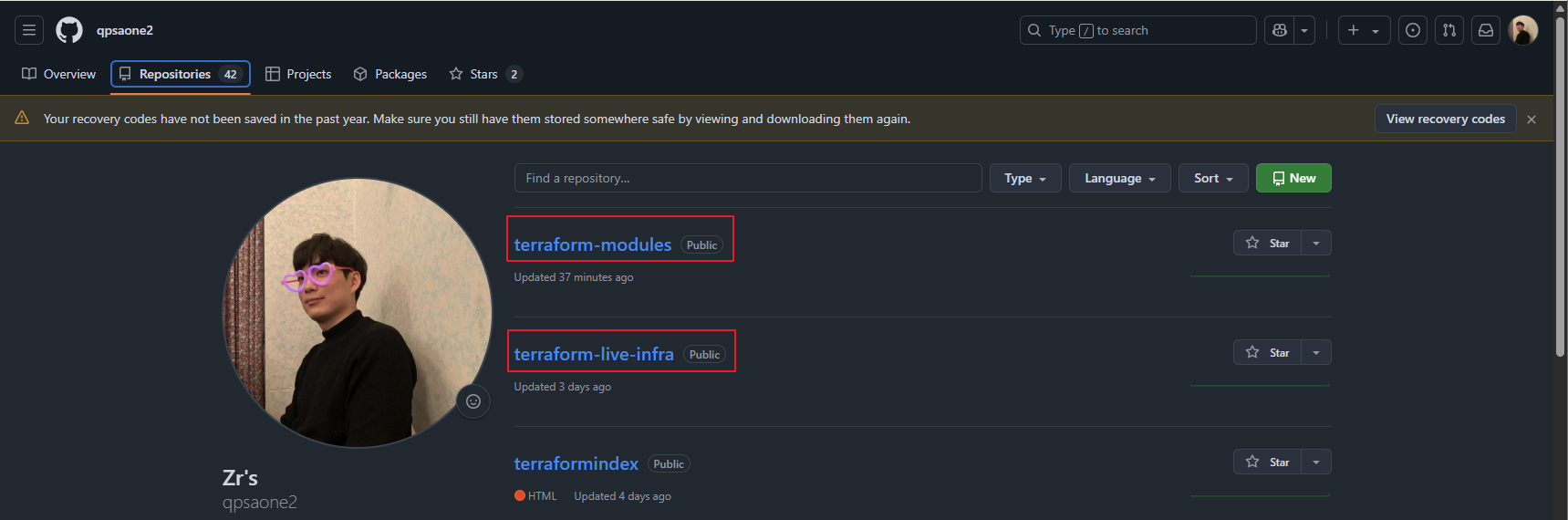
그러기 위해서는 전제로 두 프로젝트 관리를 위한 repository가 필요합니다.
현재 저는 두 개의 레포를 생성하였습니다.
terraform-moudle 프로젝트
먼저, terraform-module 프로젝트에 대한 코드입니다.
모듈 버전 관리만을 위한 간단한 테스트를 진행하기 위해 리소스 그룹만 생성하는 코드를 모듈화하여 작성하였습니다.
1. terraform/module/simple-resource-group/main.tf
리소스 그룹 생성하면서 태그를 설정합니다.
태그 ModuleVersion은 변수 module_version에서 변수를 가져와 태그에 추가되도록 설정합니다.
이렇게 진행하게되면 어떤 버전의 모듈을 사용하여 리소스 그룹을 생성하였는지 명시적으로 알 수 있습니다.
# modules/simple-resource-group/main.tf

# 이 모듈은 Azure 리소스 그룹 하나를 생성합니다.

resource "azurerm_resource_group" "example_rg" {
  name     = var.resource_group_name
  location = var.location
  tags = {
    ManagedBy = "TerraformModule"
    Purpose   = "VersionedDemo"
    ModuleVersion = var.module_version # 모듈 버전을 태그로 추가
  }
}
2. terraform/module/simple-resource-group/outputs.tf
# modules/simple-resource-group/outputs.tf

# 모듈의 출력 값들을 정의합니다.
output "created_resource_group_id" {
  description = "생성된 리소스 그룹의 ID"
  value       = azurerm_resource_group.example_rg.id
}

output "created_resource_group_name" {
  description = "생성된 리소스 그룹의 이름"
  value       = azurerm_resource_group.example_rg.name
}

output "created_resource_group_location" {
  description = "생성된 리소스 그룹의 위치"
  value       = azurerm_resource_group.example_rg.location
}
3. terraform/module/simple-resource-group/variables.tf
module_version은 string 값으로 받아올 수 있도록 변수처리하여 variables.tf 파일에서 관리합니다.
해당 변수는 실제로 리소스를 배포하는 코드를 관리하는 terraform-live-infra에서 선언합니다.
실제 리소스를 배포할때 어떤 모듈의 버전을 사용할지 선언해야하기 때문입니다.
# modules/simple-resource-group/variables.tf

# 모듈의 입력 변수들을 정의합니다.
variable "resource_group_name" {
  description = "생성할 리소스 그룹의 이름"
  type        = string
}

variable "location" {
  description = "리소스 그룹이 생성될 Azure 지역"
  type        = string
}

variable "module_version" {
  description = "모듈의 현재 버전 (태그로 사용)"
  type        = string
}
terraform-live-infra 프로젝트
다음은 실제 리소스를 배포하기 위해 관리되는 terraform-live-infra 프로젝트입니다.
1. terraform-live-infra/main.tf
# main.tf

# Terraform 설정
terraform {
  required_providers {
    azurerm = {
      source  = "hashicorp/azurerm"
      version = "~> 3.0"
    }
  }
  # 상태 파일을 로컬에 저장합니다. (간단한 실습용)
  # 실제 운영에서는 Azure Blob Storage 백엔드를 사용해야 합니다.
}

# AzureRM 프로바이더 설정
provider "azurerm" {
  features {}
}

# 'simple-resource-group' 모듈 호출
# source에 GitHub URL과 태그를 사용하여 특정 버전 모듈을 참조합니다.
# TODO: YOUR_GITHUB_USERNAME을 실제 GitHub 사용자 이름으로 변경하세요.
#       git@github.com:YOUR_GITHUB_USERNAME/terraform-modules.git
#       또는 https://github.com/YOUR_GITHUB_USERNAME/terraform-modules.git
module "my_app_resource_group" {
  #source = "git::ssh://git@github.com:YOUR_GITHUB_USERNAME/terraform-modules.git//modules/simple-resource-group?ref=v1.0.0"
  # HTTPS 방식 (공개 저장소 또는 PAT 사용 시):
  source = "git::https://github.com/qpsaone2/terraform-modules.git//modules/simple-resource-group?ref=v1.0.0"

  # 모듈의 입력 변수에 값 전달
  resource_group_name = var.app_rg_name
  location            = var.app_rg_location
  module_version      = "v1.0.0" # 모듈 버전을 명시적으로 전달 (모듈 태그와 일치)
}

# 모듈의 출력 값을 루트 모듈의 출력으로 다시 공개
output "app_resource_group_id" {
  description = "애플리케이션 리소스 그룹의 ID"
  value       = module.my_app_resource_group.created_resource_group_id
}

output "app_resource_group_name" {
  description = "애플리케이션 리소스 그룹의 이름"
  value       = module.my_app_resource_group.created_resource_group_name
}
먼저 module 호출에 관련된 코드 설명부터 진행을 하자면 다음과 같습니다.
- source 속성: Terraform에게 호출할 모듈의 **위치(소스 코드의 경로)**를 알려주는 가장 중요한 속성입니다.
- git::: 모듈 소스가 Git 저장소임을 명시하는 접두어입니다. Terraform은 이를 보고 Git 프로토콜을 사용하여 코드를 가져옵니다.
- https://github.com/qpsaone2/terraform-modules.git: 모듈 코드가 저장되어 있는 GitHub 저장소의 URL입니다. 이 저장소는 simple-resource-group 모듈의 코드를 포함하고 있습니다. (SSH 방식은 git::ssh://git@github.com:... 형태)
- //modules/simple-resource-group: Git 저장소 내에서 실제 모듈 코드가 위치한 하위 디렉터리 경로입니다. GitHub 저장소의 루트에 모듈 코드가 바로 있지 않고, modules/simple-resource-group 폴더 안에 있기 때문에 이 경로를 명시해야 합니다.
- ?ref=v1.0.0: ref 쿼리 파라미터는 Git 저장소에서 어떤 버전(태그, 브랜치, 커밋 SHA)의 모듈 코드를 가져올지를 지정합니다. 여기서는 v1.0.0이라는 Git 태그에 해당하는 모듈 코드를 사용하겠다는 의미입니다.
- 이것이 모듈 버전 관리의 핵심으로, terraform-modules 저장소에 v1.0.1 태그가 발행되어도, 이 ref=v1.0.0을 변경하지 않으면 항상 v1.0.0 버전의 모듈 코드를 사용하게 됩니다.
이 부분은 modules/simple-resource-group/variables.tf에 정의된 모듈의 입력 변수들에 값을 전달하는 부분입니다. 모듈은 이러한 입력 변수를 통해 외부(루트 모듈)로부터 필요한 정보를 받습니다.
- resource_group_name = var.app_rg_name:
- resource_group_name: simple-resource-group 모듈의 variables.tf에 정의된 변수입니다.
- var.app_rg_name: 이 값은 현재 terraform-live-infra 프로젝트의 variables.tf에 정의된 app_rg_name 변수의 값을 가져와 resource_group_name 모듈 변수에 전달합니다. 이렇게 하여 모듈이 생성할 리소스 그룹의 이름을 동적으로 지정할 수 있습니다.
- location = var.app_rg_location:
- location: simple-resource-group 모듈의 variables.tf에 정의된 변수입니다.
- var.app_rg_location: terraform-live-infra 프로젝트의 variables.tf에 정의된 app_rg_location 변수의 값을 가져와 모듈에 전달합니다.
- module_version = "v1.0.0":
- module_version: simple-resource-group 모듈의 variables.tf에 정의된 변수입니다.
- "v1.0.0": 이 문자열 값은 모듈 내부에서 tags = { ModuleVersion = var.module_version }와 같이 실제 Azure 리소스에 태그로 기록될 버전 정보를 명시적으로 전달합니다. 이 값은 source의 ref 값과 일치시켜 관리하는 것이 모범 사례입니다.
2. terraform-live-infra/variables.tf
# variables.tf

variable "app_rg_name" {
  description = "생성할 애플리케이션 리소스 그룹의 이름"
  type        = string
  default     = "my-versioned-app-rg-stage"
}

variable "app_rg_location" {
  description = "애플리케이션 리소스 그룹이 배포될 Azure 지역"
  type        = string
  default     = "koreacentral"
}terraform 모듈 버전 관리
이제 코드는 어느정도 설명을 했으니, 버전 관리를 위한 실습을 진행하도록 하겠습니다.
1. terraform-modules 프로젝트 github push
terraform-modules 프로젝트로 이동하여 생성해놓은 terraform-modules github repo로 코드를 push합니다.
# git 초기화
cheol@MZC01-CLOUDLSC0406:/mnt/c/code/terraform_code/terraform-modules$ git init
cheol@MZC01-CLOUDLSC0406:/mnt/c/code/terraform_code/terraform-modules$ ls -al
total 0
drwxrwxrwx 1 cheol cheol 4096 Aug  1 17:41 .
drwxrwxrwx 1 cheol cheol 4096 Aug  1 17:40 ..
drwxrwxrwx 1 cheol cheol 4096 Aug  1 17:41 .git
drwxrwxrwx 1 cheol cheol 4096 Aug  1 17:25 modules

# git add 및 git user_name, user_email 추가
cheol@MZC01-CLOUDLSC0406:/mnt/c/code/terraform_code/terraform-modules$ git add .
cheol@MZC01-CLOUDLSC0406:/mnt/c/code/terraform_code/terraform-modules$ git config --global user.email "cloudlsc0406@gmail.com"
cheol@MZC01-CLOUDLSC0406:/mnt/c/code/terraform_code/terraform-modules$ git config --global user.name "leesangcheol"

# git commit
cheol@MZC01-CLOUDLSC0406:/mnt/c/code/terraform_code/terraform-modules$ git commit -m "Initial commit of simple-resource-group module"
[master (root-commit) 559ef8b] Initial commit of simple-resource-group module
 3 files changed, 47 insertions(+)
 create mode 100644 modules/simple-resource-group/main.tf
 create mode 100644 modules/simple-resource-group/outputs.tf
 create mode 100644 modules/simple-resource-group/variables.tf

# branch 및 remote 확인
 cheol@MZC01-CLOUDLSC0406:/mnt/c/code/terraform_code/terraform-modules$ git branch
* master
cheol@MZC01-CLOUDLSC0406:/mnt/c/code/terraform_code/terraform-modules$ git remote add origin https://github.com/qpsaone2/terraform-modules.git
cheol@MZC01-CLOUDLSC0406:/mnt/c/code/terraform_code/terraform-modules$
cheol@MZC01-CLOUDLSC0406:/mnt/c/code/terraform_code/terraform-modules$ git remote
origin
cheol@MZC01-CLOUDLSC0406:/mnt/c/code/terraform_code/terraform-modules$ git remote -v
origin  https://github.com/qpsaone2/terraform-modules.git (fetch)
origin  https://github.com/qpsaone2/terraform-modules.git (push)

# git push
cheol@MZC01-CLOUDLSC0406:/mnt/c/code/terraform_code/terraform-modules$ git push -u origin master
/mnt/c/Program\ Files/Git/mingw64/libexec/git-core/git-credential-manager.exe get: 1: /mnt/c/Program Files/Git/mingw64/libexec/git-core/git-credential-manager.exe: not found
Username for 'https://github.com': qpsaone2
Password for 'https://qpsaone2@github.com':
/mnt/c/Program\ Files/Git/mingw64/libexec/git-core/git-credential-manager.exe store: 1: /mnt/c/Program Files/Git/mingw64/libexec/git-core/git-credential-manager.exe: not found
Enumerating objects: 7, done.
Counting objects: 100% (7/7), done.
Delta compression using up to 12 threads
Compressing objects: 100% (5/5), done.
Writing objects: 100% (7/7), 1.19 KiB | 7.00 KiB/s, done.
Total 7 (delta 0), reused 0 (delta 0), pack-reused 0
remote:
remote: Create a pull request for 'master' on GitHub by visiting:
remote:      https://github.com/qpsaone2/terraform-modules/pull/new/master
remote:
To https://github.com/qpsaone2/terraform-modules.git
 * [new branch]      master -> master
branch 'master' set up to track 'origin/master'.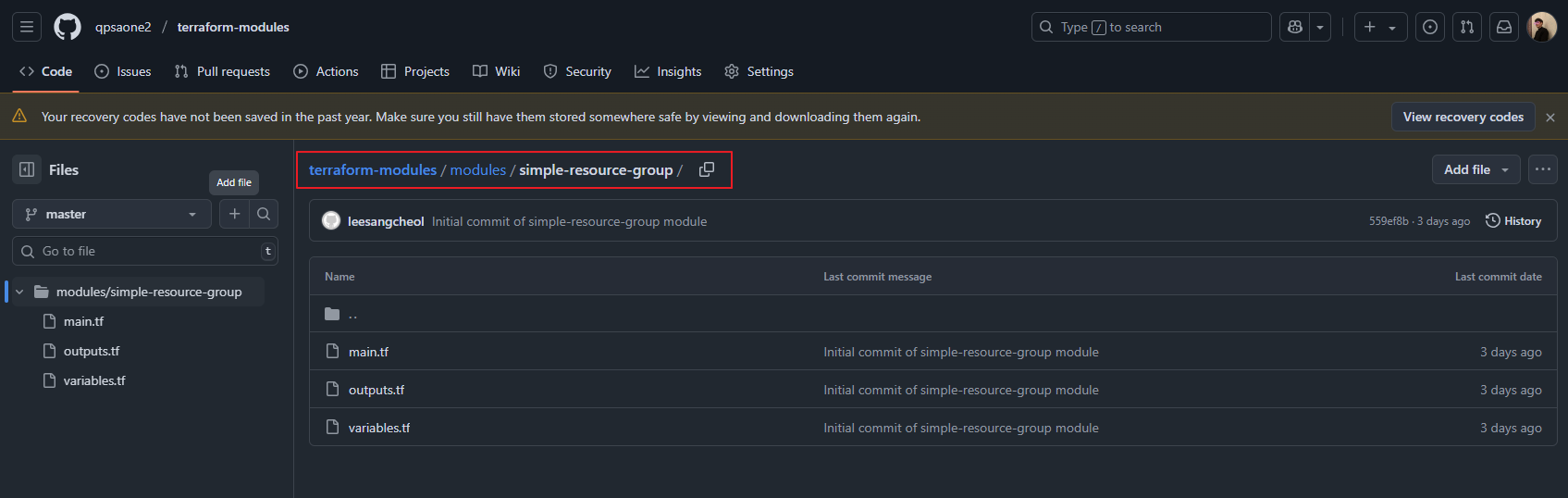
2. 초기 버전 태그 발행 (v1.0.0)
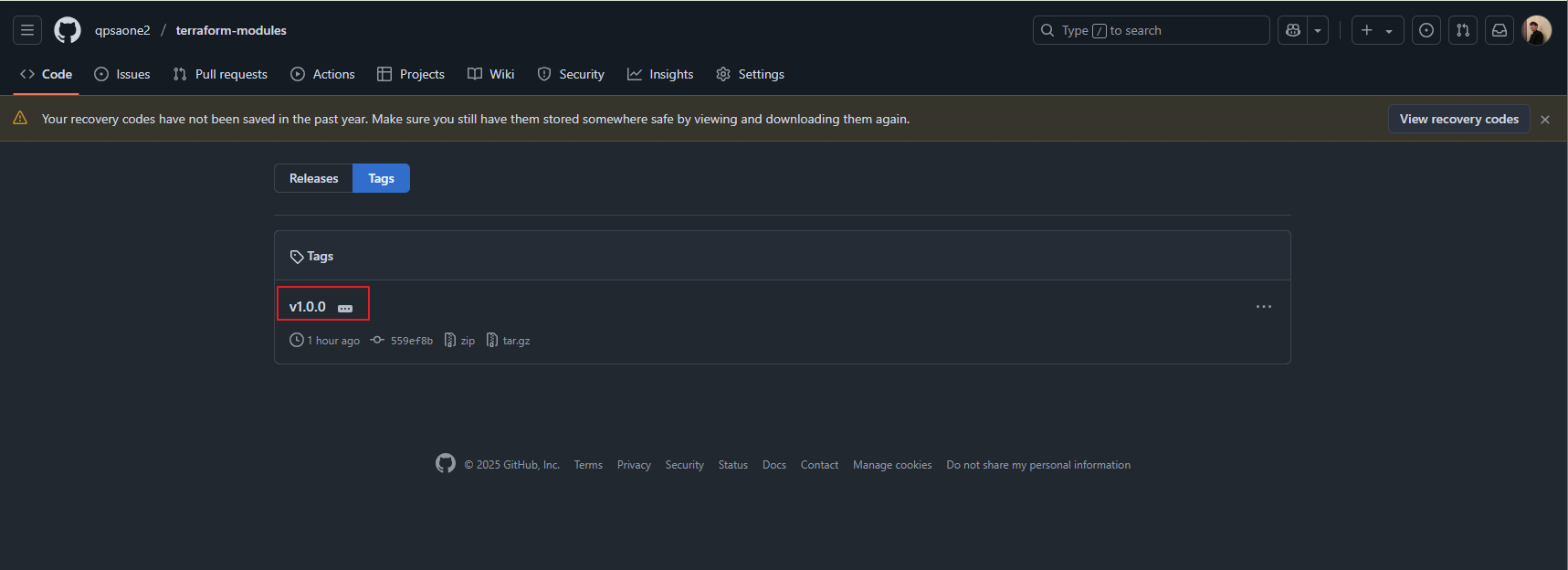
태그를 설정해서 github에 태그를 push하게 되면 terraform-modules 프로젝트는 v1.0.0으로 태그가 달리게 됩니다.
cheol@MZC01-CLOUDLSC0406:/mnt/c/code/terraform_code/terraform-modules$ git tag -a "v1.0.0" -m "First stable release of simple-resource-group module"
cheol@MZC01-CLOUDLSC0406:/mnt/c/code/terraform_code/terraform-modules$ git push origin --tags
/mnt/c/Program\ Files/Git/mingw64/libexec/git-core/git-credential-manager.exe get: 1: /mnt/c/Program Files/Git/mingw64/libexec/git-core/git-credential-manager.exe: not found
Username for 'https://github.com': cheol
Password for 'https://cheol@github.com':
/mnt/c/Program\ Files/Git/mingw64/libexec/git-core/git-credential-manager.exe store: 1: /mnt/c/Program Files/Git/mingw64/libexec/git-core/git-credential-manager.exe: not found
Enumerating objects: 1, done.
Counting objects: 100% (1/1), done.
Writing objects: 100% (1/1), 192 bytes | 3.00 KiB/s, done.
Total 1 (delta 0), reused 0 (delta 0), pack-reused 0
To https://github.com/qpsaone2/terraform-modules.git
 * [new tag]         v1.0.0 -> v1.0.0
3. terraform-live-infra 프로젝트 github push
현재 구성되어있는 상태로 terraform-live-infra 프로젝트를 github repo로 push 합니다.
현재 terraform-live-infra 프로젝트에서는 terraform-module의 v1.0.0 버전을 사용하도록 설정되어 있습니다.
# git 초기화 세팅
cheol@MZC01-CLOUDLSC0406:/mnt/c/code/terraform_code/terraform-live-infra$ git init
Initialized empty Git repository in /mnt/c/code/terraform_code/terraform-live-infra/.git/
cheol@MZC01-CLOUDLSC0406:/mnt/c/code/terraform_code/terraform-live-infra$ ls -al
total 4
drwxrwxrwx 1 cheol cheol 4096 Aug  4 13:09 .
drwxrwxrwx 1 cheol cheol 4096 Aug  1 17:40 ..
drwxrwxrwx 1 cheol cheol 4096 Aug  4 13:09 .git
-rwxrwxrwx 1 cheol cheol 1750 Aug  4 10:24 main.tf
-rwxrwxrwx 1 cheol cheol  361 Aug  1 18:03 variables.tf

# git add 및 commit
cheol@MZC01-CLOUDLSC0406:/mnt/c/code/terraform_code/terraform-live-infra$ git add .
cheol@MZC01-CLOUDLSC0406:/mnt/c/code/terraform_code/terraform-live-infra$ git commit -m "Initial commit of live infrastructure for stage environment"
[master (root-commit) 28072d8] Initial commit of live infrastructure for stage environment
 2 files changed, 58 insertions(+)
 create mode 100644 main.tf
 create mode 100644 variables.tf
cheol@MZC01-CLOUDLSC0406:/mnt/c/code/terraform_code/terraform-live-infra$

# git remote add
cheol@MZC01-CLOUDLSC0406:/mnt/c/code/terraform_code/terraform-live-infra$ git remote add origin https://github.com/qpsaone2/terraform-live-infra.git
cheol@MZC01-CLOUDLSC0406:/mnt/c/code/terraform_code/terraform-live-infra$ git remote -v
origin  https://github.com/qpsaone2/terraform-live-infra.git (fetch)
origin  https://github.com/qpsaone2/terraform-live-infra.git (push)

# git branch 확인
cheol@MZC01-CLOUDLSC0406:/mnt/c/code/terraform_code/terraform-live-infra$ git branch
* master

# git push
cheol@MZC01-CLOUDLSC0406:/mnt/c/code/terraform_code/terraform-live-infra$ git push -u origin master
/mnt/c/Program\ Files/Git/mingw64/libexec/git-core/git-credential-manager.exe get: 1: /mnt/c/Program Files/Git/mingw64/libexec/git-core/git-credential-manager.exe: not found
Username for 'https://github.com': cheol
Password for 'https://cheol@github.com':
/mnt/c/Program\ Files/Git/mingw64/libexec/git-core/git-credential-manager.exe store: 1: /mnt/c/Program Files/Git/mingw64/libexec/git-core/git-credential-manager.exe: not found
Enumerating objects: 4, done.
Counting objects: 100% (4/4), done.
Delta compression using up to 12 threads
Compressing objects: 100% (4/4), done.
Writing objects: 100% (4/4), 1.30 KiB | 11.00 KiB/s, done.
Total 4 (delta 0), reused 0 (delta 0), pack-reused 0
remote:
remote: Create a pull request for 'master' on GitHub by visiting:
remote:      https://github.com/qpsaone2/terraform-live-infra/pull/new/master
remote:
To https://github.com/qpsaone2/terraform-live-infra.git
 * [new branch]      master -> master
branch 'master' set up to track 'origin/master'.
cheol@MZC01-CLOUDLSC0406:/mnt/c/code/terraform_code/terraform-live-infra$
4. terraform 코드를 이용한 Azure 리소스 그룹 생성
v1.0.0 모듈 버전을 이용해서 Azure 리소스 그룹 생성을 진행합니다.
terraform-live-infra 프로젝트에서 terraform을 이용해서 리소스 배포를 진행합니다.
cheol@MZC01-CLOUDLSC0406:/mnt/c/code/terraform_code/terraform-live-infra$ terraform init

cheol@MZC01-CLOUDLSC0406:/mnt/c/code/terraform_code/terraform-live-infra$ terraform plan

cheol@MZC01-CLOUDLSC0406:/mnt/c/code/terraform_code/terraform-live-infra$ terraform apply --auto-approve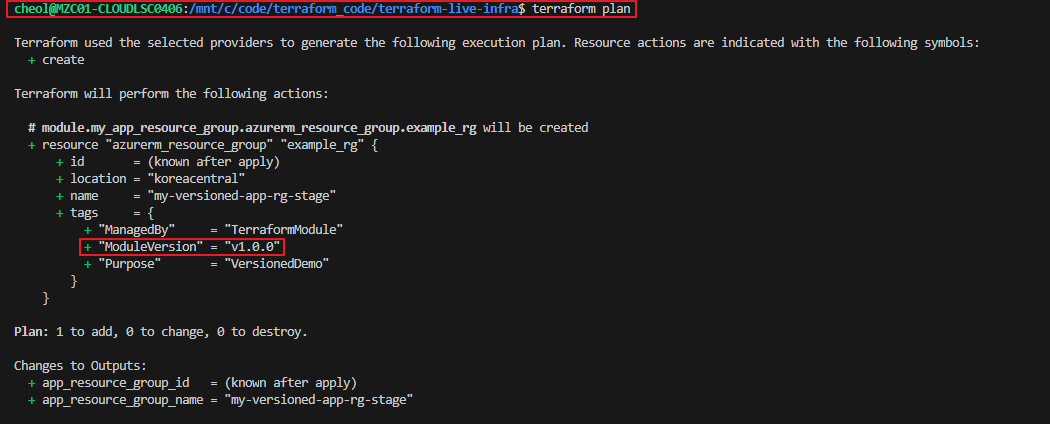

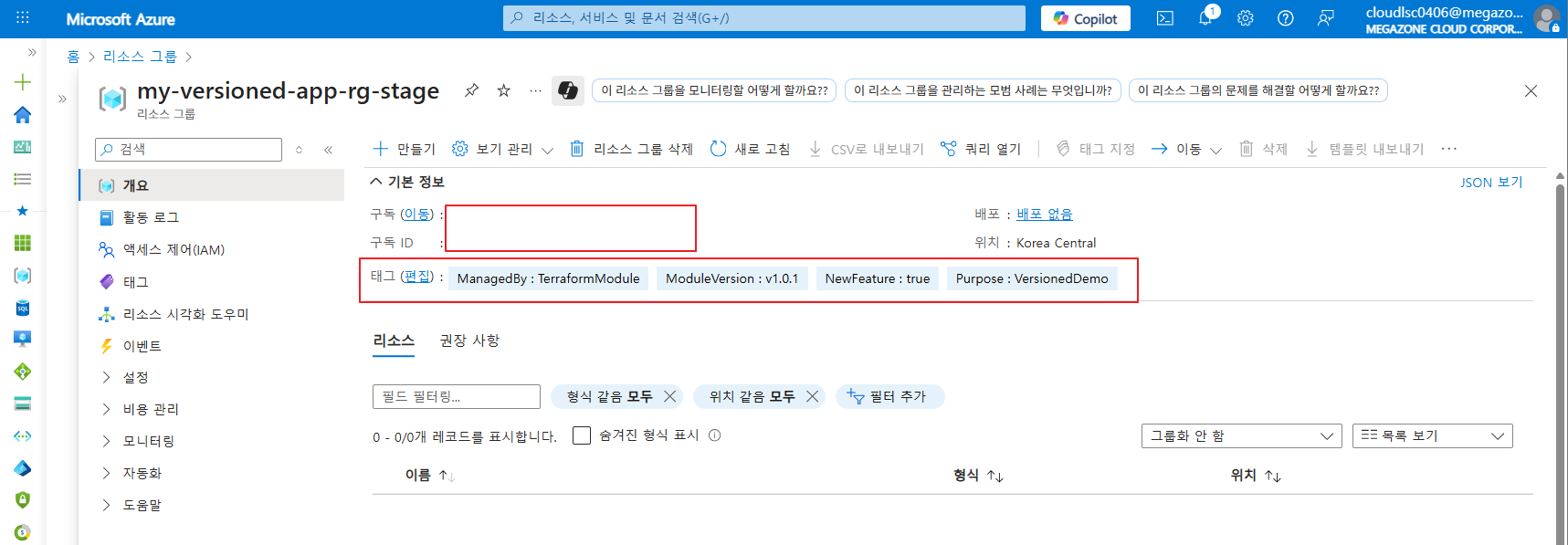
Azure portal로 접속하여 정상적으로 리소스 그룹이 생성되었으며 버전이 v1.0.0인지 확인합니다.

5. 모듈 업데이트 및 새 버전 발행 (v1.0.1)
이제 모듈 코드를 변경하고, 새로운 버전 태그를 발행한 후 terraform-live-infra에서 이를 사용하도록 업데이트 합니다.
태그 NewFeature을 새로 추가합니다. 추가된 모듈 버전이 v1.0.1입니다.
새로 수정된 코드를 저장하고 git commit 후 terraform-module github으로 push합니다.
# terraform-module 프로젝트 디렉터리로 이동
cheol@MZC01-CLOUDLSC0406:/mnt/c/code/terraform_code/terraform-live-infra$ cd ..
cheol@MZC01-CLOUDLSC0406:/mnt/c/code/terraform_code$ cd terraform-modules/
cheol@MZC01-CLOUDLSC0406:/mnt/c/code/terraform_code/terraform-modules$ ls
modules

# git add 및 commit
cheol@MZC01-CLOUDLSC0406:/mnt/c/code/terraform_code/terraform-modules$ git add .
cheol@MZC01-CLOUDLSC0406:/mnt/c/code/terraform_code/terraform-modules$ git commit -m "Added NewFeature tag to resource group"
[master 6024d96] Added NewFeature tag to resource group
 1 file changed, 1 insertion(+)

# git push
cheol@MZC01-CLOUDLSC0406:/mnt/c/code/terraform_code/terraform-modules$ git push origin master
/mnt/c/Program\ Files/Git/mingw64/libexec/git-core/git-credential-manager.exe get: 1: /mnt/c/Program Files/Git/mingw64/libexec/git-core/git-credential-manager.exe: not found
Username for 'https://github.com': cheol
Password for 'https://cheol@github.com':
/mnt/c/Program\ Files/Git/mingw64/libexec/git-core/git-credential-manager.exe store: 1: /mnt/c/Program Files/Git/mingw64/libexec/git-core/git-credential-manager.exe: not found
Enumerating objects: 9, done.
Counting objects: 100% (9/9), done.
Delta compression using up to 12 threads
Compressing objects: 100% (3/3), done.
Writing objects: 100% (5/5), 517 bytes | 5.00 KiB/s, done.
Total 5 (delta 1), reused 0 (delta 0), pack-reused 0
remote: Resolving deltas: 100% (1/1), completed with 1 local object.
To https://github.com/qpsaone2/terraform-modules.git
   559ef8b..6024d96  master -> master
cheol@MZC01-CLOUDLSC0406:/mnt/c/code/terraform_code/terraform-modules$
terraform-module repo의 버전 확인을 위해 테그를 부여하여 push합니다.
# 1. 태그 생성
git tag -a "v1.0.1" -m "Added NewFeature tag"

# 2. 태그를 원격 저장소에 푸시
git push origin --tags
6. terraform-live-infra 업데이트 및 배포
이제 terraform-live-infra 프로젝트에서 모듈의 source를 v1.0.1로 업데이트하여 변경사항을 적용합니다.
terraform get -update 명령어를 실행하여 github에서 v1.0.1 버전의 모듈 코드를 새로 다운로드 합니다.
terraform get -update
새로온 버전이 다운로드가 완료되면 terraform plan 후 배포를 진행합니다.


Azure portal로 접속하여 현재 배포되어있는 리소스그룹의 태그가 추가 및 수정 되었는지 확인합니다.
프로세스 흐름 요약
- 1단계: 모듈 개발 및 초기 버전 발행 (v1.0.0)
- 로컬에서 모듈 코드 작성 → Git 저장소 초기화 및 GitHub(terraform-modules)에 푸시 → git tag -a "v1.0.0" 명령으로 태그 발행 및 푸시.
- 2단계: 라이브 인프라 초기 배포 (모듈 v1.0.0 참조)
- 로컬에서 루트 모듈 코드 작성 → main.tf에서 모듈 source를 **git::.../?ref=v1.0.0**으로 설정 → Git 저장소 초기화 및 GitHub(terraform-live-infra)에 푸시 → terraform init, terraform apply로 인프라 배포.
- 3단계: 모듈 업데이트 및 새 버전 발행 (v1.0.1)
- 로컬에서 모듈 코드 수정(예: 새로운 태그 추가) → Git 커밋 및 GitHub(terraform-modules)에 푸시 → git tag -a "v1.0.1" 명령으로 새 태그 발행 및 푸시.
- 4단계: 라이브 인프라 업데이트 (예: 스테이징 환경)
- 로컬에서 루트 모듈 코드(terraform-live-infra/main.tf) 수정 → 모듈 source의 ref를 **v1.0.1**로 변경 → Git 커밋 및 GitHub에 푸시 → terraform get -update로 새 모듈 다운로드 → terraform plan, terraform apply로 인프라 업데이트.
- 5단계: 상용 환경으로 프로모션 (선택 사항)
- 스테이징 환경에서 v1.0.1이 충분히 검증되면, 상용 환경의 main.tf (별도 브랜치/저장소)에서 ref를 v1.0.1로 업데이트하고 배포.
- 스테이징 환경에서 v1.0.1이 충분히 검증되면, 상용 환경의 main.tf (별도 브랜치/저장소)에서 ref를 v1.0.1로 업데이트하고 배포.
추가적인 서비스(Azure Virtual Machine) 배포
리소스 그룹의 태그 변경이 아닌 생성되어있는 리소스 그룹에 추가적으로 서비스를 배포해보도록 하겠습니다.
가상머신의 v1.0.2 버전 모듈을 정의하고 배포하도록 하겠습니다.
우선, 디렉터리 구조는 다음과 같습니다.
cheol@MZC01-CLOUDLSC0406:/mnt/c/code/terraform_code$ tree
.
├── terraform-live-infra
│   ├── main.tf
│   ├── terraform.tfstate
│   ├── terraform.tfstate.backup
│   └── variables.tf
└── terraform-modules
    └── modules
        ├── simple-resource-group
        │   ├── main.tf
        │   ├── outputs.tf
        │   └── variables.tf
        └── virtual-machine
            ├── main.tf
            ├── outputs.tf
            ├── user-data.sh.tpl
            └── variables.tf
terraform-modules 프로젝트 (virtual-machine)
1. terraform-modules/modules/virtual-machine/main.tf
# modules/virtual-machine/main.tf

# 이 모듈은 기존 리소스 그룹 안에 단일 Azure VM을 프로비저닝합니다.

# 1. 가상 네트워크 및 서브넷 생성
resource "azurerm_virtual_network" "vm_vnet" {
  name                = "${var.vm_name}-vnet"
  address_space       = ["10.0.0.0/16"]
  location            = var.location
  resource_group_name = var.resource_group_name # 기존 RG 이름 사용
  tags = {
    ManagedBy     = "TerraformModule"
    ModuleVersion = var.module_version
  }
}

resource "azurerm_subnet" "vm_subnet" {
  name                 = "${var.vm_name}-subnet"
  resource_group_name  = var.resource_group_name
  virtual_network_name = azurerm_virtual_network.vm_vnet.name
  address_prefixes     = ["10.0.1.0/24"]
}

# 2. Public IP 주소 생성
resource "azurerm_public_ip" "vm_public_ip" {
  name                = "${var.vm_name}-public-ip"
  location            = var.location
  resource_group_name = var.resource_group_name
  allocation_method   = "Static"
  sku                 = "Standard"
  tags = {
    ManagedBy     = "TerraformModule"
    ModuleVersion = var.module_version
  }
}

# 3. 네트워크 보안 그룹 (NSG) 생성
resource "azurerm_network_security_group" "vm_nsg" {
  name                = "${var.vm_name}-nsg"
  location            = var.location
  resource_group_name = var.resource_group_name
  tags = {
    ManagedBy     = "TerraformModule"
    ModuleVersion = var.module_version
  }
}

# 4. NSG 규칙: SSH (22번 포트) 허용
resource "azurerm_network_security_rule" "allow_ssh" {
  name                        = "AllowSSH"
  priority                    = 100
  direction                   = "Inbound"
  access                      = "Allow"
  protocol                    = "Tcp"
  source_port_range           = "*"
  destination_port_range      = "22"
  source_address_prefix       = "*"
  destination_address_prefix  = "*"
  resource_group_name         = var.resource_group_name
  network_security_group_name = azurerm_network_security_group.vm_nsg.name
}

# 5. NSG 규칙: HTTP (80번 포트) 허용
resource "azurerm_network_security_rule" "allow_http" {
  name                        = "AllowHTTP"
  priority                    = 110
  direction                   = "Inbound"
  access                      = "Allow"
  protocol                    = "Tcp"
  source_port_range           = "*"
  destination_port_range      = "80"
  source_address_prefix       = "*"
  destination_address_prefix  = "*"
  resource_group_name         = var.resource_group_name
  network_security_group_name = azurerm_network_security_group.vm_nsg.name
}

# 6. 네트워크 인터페이스 생성
resource "azurerm_network_interface" "vm_nic" {
  name                = "${var.vm_name}-nic"
  location            = var.location
  resource_group_name = var.resource_group_name
  tags = {
    ManagedBy     = "TerraformModule"
    ModuleVersion = var.module_version
  }

  ip_configuration {
    name                          = "internal"
    subnet_id                     = azurerm_subnet.vm_subnet.id
    private_ip_address_allocation = "Dynamic"
    public_ip_address_id          = azurerm_public_ip.vm_public_ip.id
  }
}

# 7. NSG를 네트워크 인터페이스에 연결
resource "azurerm_network_interface_security_group_association" "nic_nsg_association" {
  network_interface_id        = azurerm_network_interface.vm_nic.id
  network_security_group_id = azurerm_network_security_group.vm_nsg.id
}

# 8. Linux 가상 머신 생성
resource "azurerm_linux_virtual_machine" "single_vm" {
  name                            = var.vm_name
  resource_group_name             = var.resource_group_name
  location                        = var.location
  size                            = var.vm_size
  admin_username                  = var.admin_username
  admin_ssh_key {
    username = var.admin_username
    public_key = file(var.public_ssh_key_path) # SSH 공개 키 파일 경로
  }
  network_interface_ids           = [azurerm_network_interface.vm_nic.id]

  os_disk {
    caching              = "ReadWrite"
    storage_account_type = "Standard_LRS"
  }

  source_image_reference {
    publisher = "Canonical"
    offer     = "0001-com-ubuntu-server-jammy"
    sku       = "22_04-lts-gen2"
    version   = "latest"
  }

  # user data 스크립트에 동적 데이터 주입 (templatefile 함수 사용)
  user_data = base64encode(templatefile("${path.module}/user-data.sh.tpl", {
    vm_name        = var.vm_name
    web_server_port = var.web_server_port
    module_version  = var.module_version # 모듈 버전을 스크립트에 주입
  }))

  tags = {
    Environment   = var.environment
    Project       = "SingleVM"
    ModuleVersion = var.module_version # VM에도 모듈 버전을 태그로 추가
  }
}
2. terraform-modules/modules/virtual-machine/outputs.tf
# modules/virtual-machine/outputs.tf

# 모듈의 출력 값들을 정의합니다.
output "vm_public_ip_address" {
  description = "생성된 VM의 Public IP 주소"
  value       = azurerm_public_ip.vm_public_ip.ip_address
}

output "vm_private_ip_address" {
  description = "생성된 VM의 Private IP 주소"
  value       = azurerm_network_interface.vm_nic.private_ip_address
}

output "vm_id" {
  description = "생성된 VM의 ID"
  value       = azurerm_linux_virtual_machine.single_vm.id
}

output "vm_name" {
  description = "생성된 VM의 이름"
  value       = azurerm_linux_virtual_machine.single_vm.name
}
3. terraform-modules/modules/virtual-machine/user-data.sh.tpl
#!/bin/bash
# user-data.sh.tpl

# 웹 서버 설치 및 설정 (Apache2 설치)
echo "Installing Apache2 Web Server..."
sudo apt-get update -y
sudo apt-get install apache2 -y

# Apache2의 기본 웹 루트인 /var/www/html 디렉토리가 Apache2 설치 전에 없었다면 생성
echo "Ensuring /var/www/html directory exists..."
sudo mkdir -p /var/www/html

# 인덱스 페이지 생성 및 동적 데이터 주입
cat > /var/www/html/index.html <<EOF
<!DOCTYPE html>
<html>
<head>
    <title>VM Info</title>
    <style>
        body { font-family: sans-serif; background-color: #f0f0f0; padding: 20px; }
        .container { background-color: #fff; padding: 30px; border-radius: 8px; box-shadow: 0 4px 8px rgba(0,0,0,0.1); }
        h1 { color: #333; }
        p { color: #555; }
        strong { color: #007bff; }
    </style>
</head>
<body>
    <div class="container">
        <h1>Hello from Terraform-managed Single VM!</h1>
        <p>This VM is named: <strong>${vm_name}</strong></p>
        <p>Web Server Port: <strong>${web_server_port}</strong></p>
        <p>Deployed with Module Version: <strong>${module_version}</strong></p>
    </div>
</body>
</html>
EOF

# Apache2 서비스 재시작
echo "Restarting Apache2 service..."
sudo systemctl restart apache2
sudo systemctl enable apache2 # VM 재부팅 시 자동 시작 설정

echo "Web server (Apache2) started on port ${web_server_port}."
4. terraform-modules/modules/virtual-machine/variables.tf
# modules/virtual-machine/variables.tf

# 모듈의 입력 변수들을 정의합니다.
variable "resource_group_name" {
  description = "VM이 생성될 기존 리소스 그룹의 이름"
  type        = string
}

variable "location" {
  description = "VM이 생성될 Azure 지역"
  type        = string
}

variable "vm_name" {
  description = "생성할 가상 머신의 이름"
  type        = string
}

variable "vm_size" {
  description = "가상 머신의 크기 (예: Standard_B1s)"
  type        = string
  default     = "Standard_B1s"
}

variable "admin_username" {
  description = "VM 관리자 사용자 이름"
  type        = string
}

variable "public_ssh_key_path" {
  description = "VM에 주입할 SSH 공개 키 파일의 로컬 경로"
  type        = string
}

variable "web_server_port" {
  description = "웹 서버가 리스닝할 포트"
  type        = number
  default     = 80
}

variable "environment" {
  description = "배포 환경 (예: dev, stage, prod)"
  type        = string
}

variable "module_version" {
  description = "모듈의 현재 버전 (리소스 태그 및 user_data에 사용)"
  type        = string
}terraform-live-infra 프로젝트
terraform-live-infra 프로젝트에 새로 추가할 가상머신의 모듈을 호출하는 코드를 추가해줘야합니다.
아래 내용을 terraform-live-infra/main.tf에 추가합니다.
기존 리소스그룹에 새로운 가상머신을 배포하기 위한 모듈 호출 코드입니다.
추후 과정에서 terraform-module 프로젝트의 virtual-machine에 대해 태그를 push한 후 그 github repo에서 모듈을 호출하여 (source로 가져와서) 실질적인 변수값 전달을 통해 가상머신이 생성됩니다.
terraform 모듈 프로젝트 버전 관리
1. 먼저 terraform-module 프로젝트를 버전관리하기 위해 github으로 push합니다.
# terraform-module 프로젝트 이동
cheol@MZC01-CLOUDLSC0406:/mnt/c/code/terraform_code$ cd terraform-modules/
cheol@MZC01-CLOUDLSC0406:/mnt/c/code/terraform_code/terraform-modules$ ls
modules

# git add 및 commit
cheol@MZC01-CLOUDLSC0406:/mnt/c/code/terraform_code/terraform-modules$ git add .
cheol@MZC01-CLOUDLSC0406:/mnt/c/code/terraform_code/terraform-modules$ git commit -m "Added single-vm module (v1.0.2)"
[master 9908f50] Added single-vm module (v1.0.2)
 5 files changed, 254 insertions(+)
 create mode 100644 .terraform/modules/modules.json
 create mode 100644 modules/virtual-machine/main.tf
 create mode 100644 modules/virtual-machine/outputs.tf
 create mode 100644 modules/virtual-machine/user-data.sh.tpl
 create mode 100644 modules/virtual-machine/variables.tf

# git tag
cheol@MZC01-CLOUDLSC0406:/mnt/c/code/terraform_code/terraform-modules$ git tag -a "v1.0.2" -m "Added single-vm module"

# git push
cheol@MZC01-CLOUDLSC0406:/mnt/c/code/terraform_code/terraform-modules$ git push origin master --tags
/mnt/c/Program\ Files/Git/mingw64/libexec/git-core/git-credential-manager.exe get: 1: /mnt/c/Program Files/Git/mingw64/libexec/git-core/git-credential-manager.exe: not found
Username for 'https://github.com': cheol
Password for 'https://cheol@github.com':
/mnt/c/Program\ Files/Git/mingw64/libexec/git-core/git-credential-manager.exe store: 1: /mnt/c/Program Files/Git/mingw64/libexec/git-core/git-credential-manager.exe: not found
Enumerating objects: 14, done.
Counting objects: 100% (14/14), done.
Delta compression using up to 12 threads
Compressing objects: 100% (9/9), done.
Writing objects: 100% (12/12), 3.83 KiB | 39.00 KiB/s, done.
Total 12 (delta 0), reused 0 (delta 0), pack-reused 0
To https://github.com/qpsaone2/terraform-modules.git
   6024d96..9908f50  master -> master
 * [new tag]         v1.0.2 -> v1.0.2
cheol@MZC01-CLOUDLSC0406:/mnt/c/code/terraform_code/terraform-modules$
태그 생성 후 github으로 push 했기때문에 github에서 새로운 태그가 추가되어 모듈 코드가 업로드 된 것을 확인할 수 있습니다.


2. terraform-live-infra 프로젝트 배포
terraform-live-infra 프로젝트 디렉터리에서 terraform을 이용해 가상머신을 배포합니다.
먼저, terraform-live-infra github repo에 소스코드를 업로드합니다.
cheol@MZC01-CLOUDLSC0406:/mnt/c/code/terraform_code/terraform-live-infra$ git push origin master
/mnt/c/Program\ Files/Git/mingw64/libexec/git-core/git-credential-manager.exe get: 1: /mnt/c/Program Files/Git/mingw64/libexec/git-core/git-credential-manager.exe: not found
Username for 'https://github.com': cheol
Password for 'https://cheol@github.com':
/mnt/c/Program\ Files/Git/mingw64/libexec/git-core/git-credential-manager.exe store: 1: /mnt/c/Program Files/Git/mingw64/libexec/git-core/git-credential-manager.exe: not found
Enumerating objects: 11, done.
Counting objects: 100% (11/11), done.
Delta compression using up to 12 threads
Compressing objects: 100% (7/7), done.
Writing objects: 100% (8/8), 2.55 KiB | 100.00 KiB/s, done.
Total 8 (delta 2), reused 7 (delta 1), pack-reused 0
remote: Resolving deltas: 100% (2/2), completed with 1 local object.
To https://github.com/qpsaone2/terraform-live-infra.git
   28072d8..6f7e802  master -> master
cheol@MZC01-CLOUDLSC0406:/mnt/c/code/terraform_code/terraform-live-infra$
3. terraform-live-infra 프로젝트 모듈 업데이트
terraform get -update
4. terraform-live-infra 배포
terraform 코드 plan 및 apply를 진행하여 Azure에 v1.0.2 버전의 모듈을 사용하여 가상머신을 새로 배포합니다.
terraform plan

terraform apply --auto-approve
정상적으로 v1.0.2 버전 모듈을 사용해서 배포가 된 것을 확인할 수 있습니다.
(리소스 그룹의 경우 v1.0.1 모듈을 사용해서 배포한 것은 유지 됩니다. 모듈이 나눠져있기 때문입니다. )

'Terraform' 카테고리의 다른 글
| [Terraform] 복잡한 조건문 (조건 분기) (4) | 2025.08.08 |
|---|---|
| [Terraform] 반복문 및 조건문 (2) | 2025.08.05 |
| [Terraform] 테라폼 모듈 (2) | 2025.08.01 |
| [Terraform] 상태 파일(tfstate) 관리 (0) | 2025.07.31 |
| [Terraform] 동적 데이터 처리와 tfstate 상태 관리 분석 with Azure Blob (2) | 2025.07.31 |
