
1. 내용
- Azure Blob Storage에 이미지를 업로드하기 위해 SAS Token을 가져온다.
- SAS Token을 가져오기 위해서 Azure SDK for java를 사용한다.
- Java API Server를 만들어서 SAS Token을 요청하고 응답받는다. 해당 서버에서 SAS Token을 SAS URL을 변환 및 반환하여 해당 URL로 Blob Storage에 이미지를 업로드할 수 있도록 테스트를 진행한다.
* 테스트 이유
- 하기 테스트를 진행하게 된 이유는 AWS S3에 Pre-signed를 대체할 수 있는 Azure 기술을 테스트 하기 위함이다.
2. 아키텍처 흐름도

3. 테스트
1) 사전 테스트 환경 준비
- VS Code 다운로드
- Java 17 및 Maven 설치
- Azure Blob Storage 생성
- 업로드할 이미지 준비
2) Java API Server
- https://start.spring.io/ 로 접속하여 간단한 프로젝트를 생성한다.
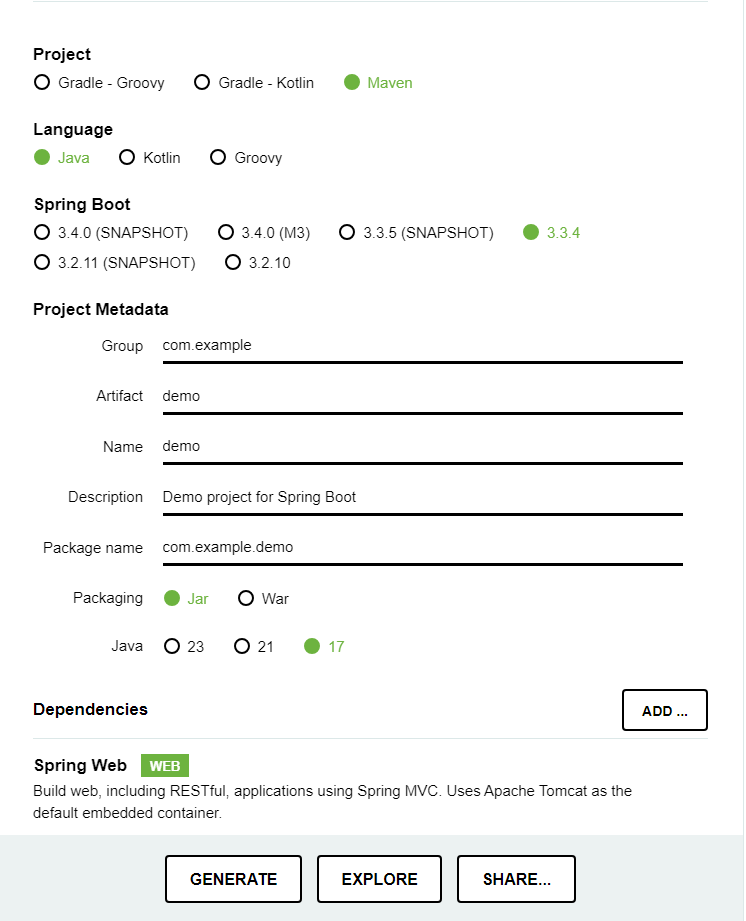
3) pom.xml 설정
- 아래 pom.xml 파일과 같이 설정을 진행한다.
<?xml version="1.0" encoding="UTF-8"?>
<project xmlns="http://maven.apache.org/POM/4.0.0" xmlns:xsi="http://www.w3.org/2001/XMLSchema-instance"
	xsi:schemaLocation="http://maven.apache.org/POM/4.0.0 https://maven.apache.org/xsd/maven-4.0.0.xsd">
	<modelVersion>4.0.0</modelVersion>
	<parent>
		<groupId>org.springframework.boot</groupId>
		<artifactId>spring-boot-starter-parent</artifactId>
		<version>3.3.4</version>
		<relativePath/> <!-- lookup parent from repository -->
	</parent>
	<groupId>com.ollacare</groupId>
	<artifactId>sas-api</artifactId>
	<version>0.0.1-SNAPSHOT</version>
	<name>sas-api</name>
	<description>SAS-API</description>
	<url/>
	<licenses>
		<license/>
	</licenses>
	<developers>
		<developer/>
	</developers>
	<scm>
		<connection/>
		<developerConnection/>
		<tag/>
		<url/>
	</scm>
	<properties>
		<java.version>17</java.version>
	</properties>
	<dependencies>
		<dependency>
			<groupId>org.springframework.boot</groupId>
			<artifactId>spring-boot-starter-web</artifactId>
		</dependency>

		<dependency>
			<groupId>org.springframework.boot</groupId>
			<artifactId>spring-boot-starter-test</artifactId>
			<scope>test</scope>
		</dependency>
				<!-- Spring Boot Starter Web -->
		<dependency>
			<groupId>org.springframework.boot</groupId>
			<artifactId>spring-boot-starter-web</artifactId>
		</dependency>

		<!-- Azure Storage Blob -->
		<dependency>
			<groupId>com.azure</groupId>
			<artifactId>azure-storage-blob</artifactId>
			<version>12.28.0</version>
		</dependency>

		<!-- Azure Identity -->
		<dependency>
			<groupId>com.azure</groupId>
			<artifactId>azure-identity</artifactId>
			<version>1.5.0</version>
		</dependency>
	</dependencies>

	<build>
		<plugins>
			<plugin>
				<groupId>org.springframework.boot</groupId>
				<artifactId>spring-boot-maven-plugin</artifactId>
			</plugin>
		</plugins>
	</build>

</project>
4) REST API Controller
src > main > java > com > ollacare > sas_api > SasApiApplication.java
// 패키지 선언
package com.ollacare.sas_api;

// Spring Boot 관련 클래스 임포트
import org.springframework.boot.SpringApplication;
import org.springframework.boot.autoconfigure.SpringBootApplication;
import org.springframework.web.bind.annotation.GetMapping;
import org.springframework.web.bind.annotation.RestController;

// Azure Blob Storage 관련 클래스 임포트
import com.azure.storage.blob.BlobContainerClient;
import com.azure.storage.blob.BlobServiceClient;
import com.azure.storage.blob.BlobServiceClientBuilder;
import com.azure.storage.blob.sas.BlobSasPermission;
import com.azure.storage.blob.sas.BlobServiceSasSignatureValues;
import com.azure.storage.common.sas.SasProtocol;

import java.time.OffsetDateTime;

// Spring Boot 애플리케이션 설정 및 REST 컨트롤러 선언
@SpringBootApplication
@RestController
public class SasApiApplication {

    // Azure Blob Storage 계정 정보
    private static final String ACCOUNT_NAME = "YOUR_ACCOUNT_NAME";
    private static final String ACCOUNT_KEY = "YOUR_ACCOUNT_ACCESS_KEY";
    private static final String CONTAINER_NAME = "YOUR_BLOB_CONTAINER_NAME";

    // 애플리케이션 메인 메서드
    public static void main(String[] args) {
        SpringApplication.run(SasApiApplication.class, args);
    }

    // SAS 토큰 생성 엔드포인트
    @GetMapping("/generateSasToken")
    public String generateSasToken() {
        // Azure Blob Storage 연결 문자열 생성
        String connectionString = String.format("DefaultEndpointsProtocol=https;AccountName=%s;AccountKey=%s;EndpointSuffix=core.windows.net", ACCOUNT_NAME, ACCOUNT_KEY);

        // BlobServiceClient 생성
        BlobServiceClient blobServiceClient = new BlobServiceClientBuilder().connectionString(connectionString).buildClient();

        // SAS 토큰 만료 시간 설정
        OffsetDateTime expiryTime = OffsetDateTime.now().plusHours(1);

        // SAS 토큰 생성에 필요한 권한 설정
        BlobSasPermission permission = new BlobSasPermission().setCreatePermission(true).setWritePermission(true);

        // SAS 토큰 생성에 필요한 값 설정
        BlobServiceSasSignatureValues values = new BlobServiceSasSignatureValues(expiryTime, permission)
                .setProtocol(SasProtocol.HTTPS_ONLY);

        // BlobContainerClient 생성 및 SAS 토큰 생성
        BlobContainerClient containerClient = blobServiceClient.getBlobContainerClient(CONTAINER_NAME);
        String sasToken = containerClient.generateSas(values);

        // SAS 토큰이 포함된 URL 생성
        String blobEndpoint = String.format("https://%s.blob.core.windows.net", ACCOUNT_NAME);
        String sasUrl = String.format("%s/%s?%s", blobEndpoint, CONTAINER_NAME, sasToken);

        return sasUrl;
    }
}
5) POSTMAN 테스트
- SAS URL 반환을 위해 http://localhost:8080/generateSasToken으로 GET 요청
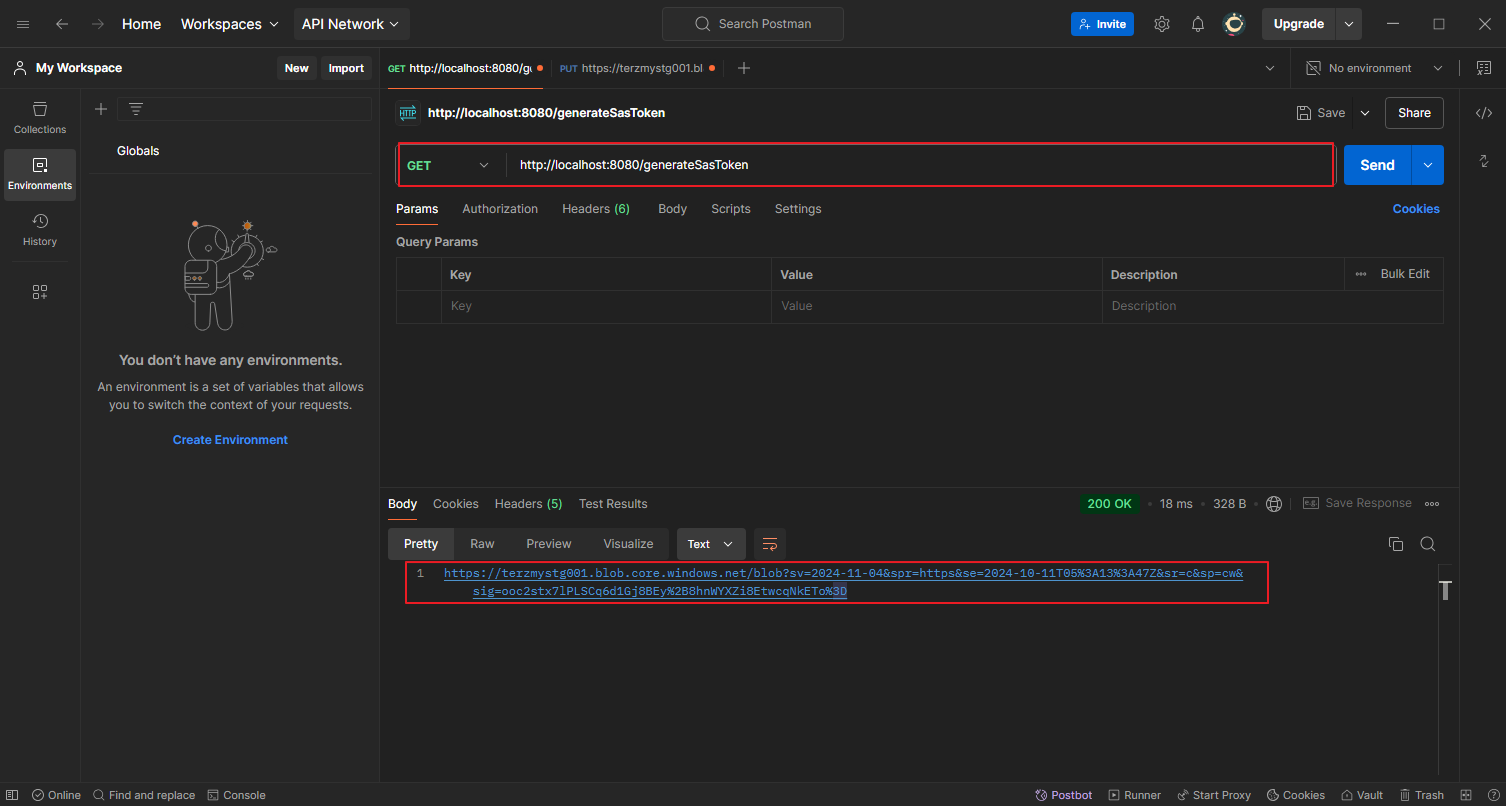
- 해당 URL 기반으로 Azure Blob Storage에 이미지 업로드 PUT 테스트
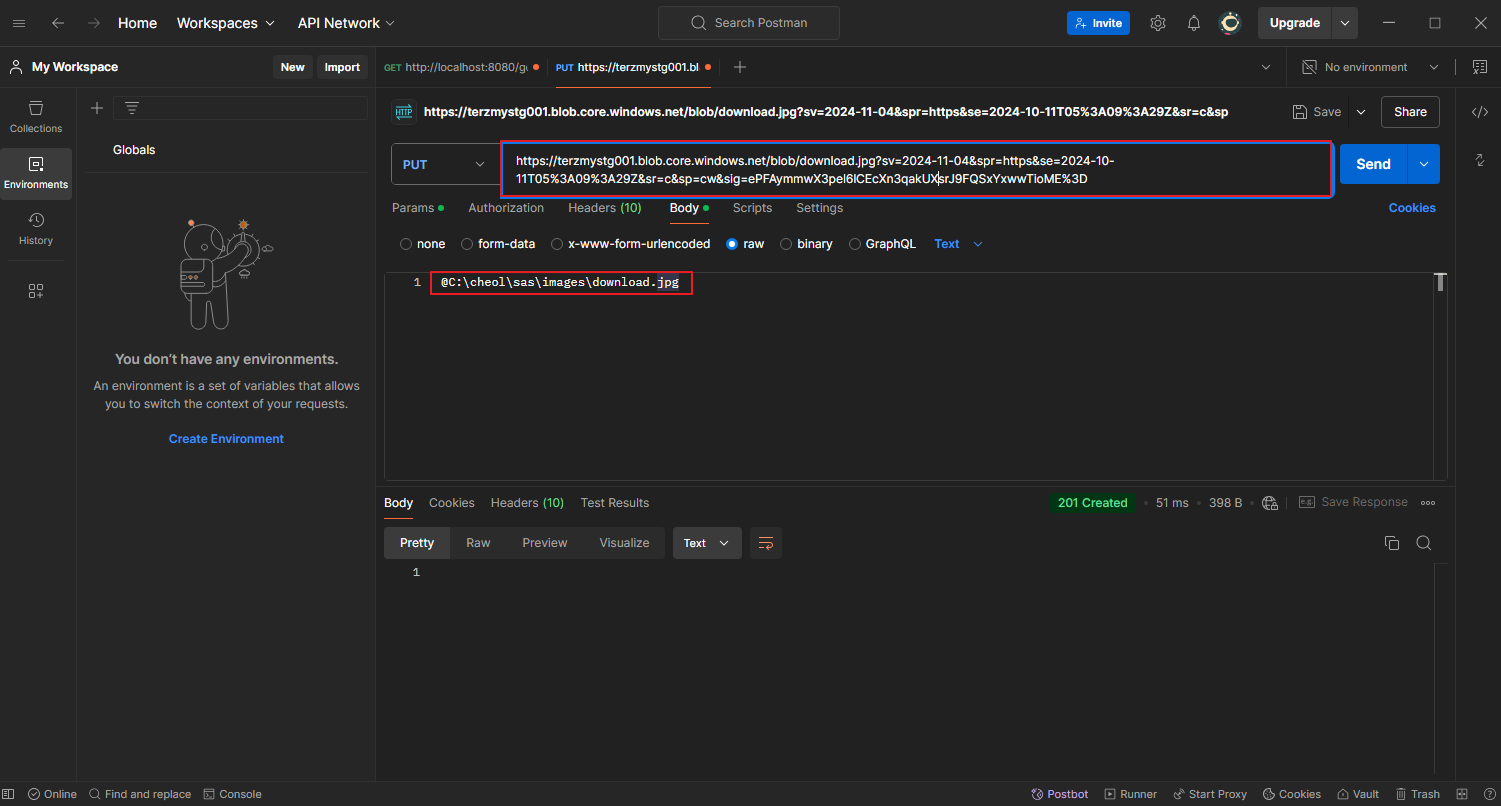
- Azure Blob Storage 이미지 업로드 확인
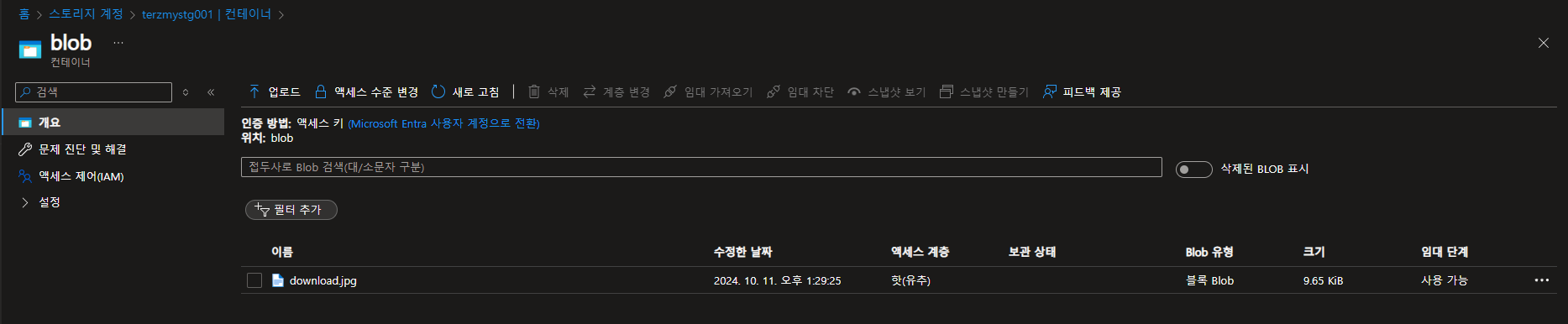
'Azure' 카테고리의 다른 글
| [Study] Public & Private AKS Cluster (0) | 2024.10.21 |
|---|---|
| [Study] Gitlab(CI)&ArgoCD를 이용해 AKS 배포 (1) | 2024.10.16 |
| Managed Grafana & Prometheus를 이용한 AKS Monitoring (0) | 2024.10.04 |
| AKS에서 Grafana Loki & Prometheus를 이용해서 모니터링 (0) | 2024.10.01 |
| GitLab & Jenkins를 이용한 AKS CI/CD (0) | 2024.09.25 |
